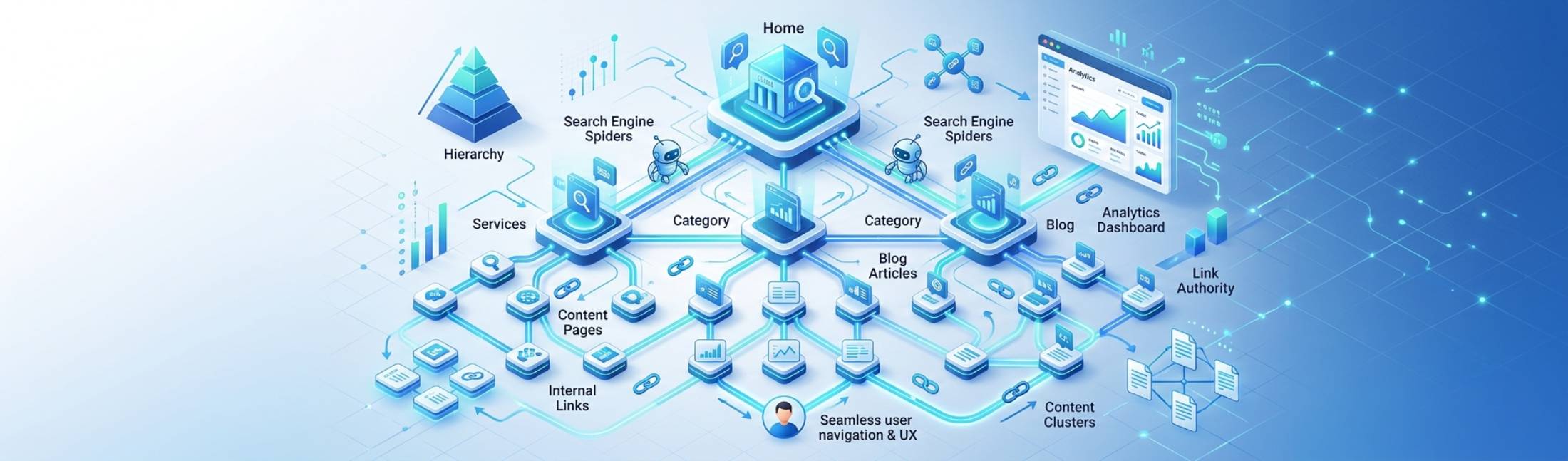
Internal linking is often overlooked, but it’s one of the most powerful tools for both SEO and user experience (UX). Properly structured internal links guide visitors through your website, distribute page authority, and help search engines understand your site’s hierarchy and content relationships.
A well-designed linking structure boosts crawlability, enhances topic authority, and improves user engagement—all critical signals for search engines and usability. This blog explores best practices for internal linking, its SEO benefits, and how to create user-friendly flows that maximize both traffic and conversions.
Understanding Internal Linking and Its Dual Role

Internal links are hyperlinks that connect one page of your website to another. Unlike external links, which point to other domains, internal links serve two primary purposes:
- SEO Benefits
- Distribute link equity (authority) across pages
- Improve crawl efficiency for search engines
- Help define topical clusters and relevance
- User Experience Benefits
- Guide visitors to related content
- Reduce bounce rates by keeping users engaged
- Make site navigation intuitive and predictable
The best internal linking strategies balance these two goals, creating a seamless experience for humans while communicating structure to search engines.
Principles of Effective Internal Linking
Internal linking should follow clear principles that support SEO strength and user flow:
Hierarchical Structure
Design your site like a pyramid:
- Homepage → Category Pages → Subcategories → Individual Articles/Products
This structure signals importance and relationships between pages.
Contextual Relevance
Links should naturally fit within content. For example:
- In a blog about “SEO Writing,” link to “Keyword Research Guide” instead of unrelated topics.
Contextual links improve both click-through rates and semantic understanding.
Anchor Text Strategy
- Use descriptive, meaningful anchor text instead of generic phrases like “click here.”
- Incorporate keywords naturally but avoid over-optimization.
- Mix exact match, partial match, and branded anchors for a natural linking profile.
Limit Link Depth
Pages should ideally be reachable within 3–4 clicks from the homepage. This reduces “orphaned pages” and ensures link equity flows effectively.
Internal Linking Patterns That Boost SEO
Content Hubs and Clusters
Organize content into clusters:
- Pillar Page: Broad overview of a topic
- Cluster Pages: In-depth subtopics
- Link cluster pages to the pillar and vice versa
This signals topical authority and increases the likelihood of ranking for multiple related keywords.
Related Posts and Cross-Linking
- Add links at the end or within the content to related articles
- Improves user engagement by encouraging further reading
- Strengthens semantic relationships for search engines
Breadcrumbs
- Display navigational breadcrumbs for hierarchy awareness
- Supports UX and internal link flow
- Provides additional keyword-rich links for SEO
Avoiding Common Internal Linking Mistakes
Even with the best intentions, errors in linking can hurt SEO and UX:
- Over-linking: Too many links on a page dilute authority and confuse users.
- Orphan Pages: Pages without inbound links are hard to find for both users and search engines.
- Broken Links: They disrupt flow, harm UX, and reduce crawl efficiency.
- Irrelevant Links: Linking unrelated pages can confuse users and weaken topical authority.
Regular audits ensure a clean, purposeful internal link structure.
Tools and Strategies for Optimizing Internal Links
Several strategies and tools can help:
- Site Audits: Tools like Screaming Frog or Ahrefs can identify orphan pages and broken links.
- Content Inventory: Map out all pages to visualize relationships and link opportunities.
- Internal Link Recommendations: Some CMS platforms suggest relevant internal links while drafting content.
- Link Hierarchy Planning: Use spreadsheets or diagrams to design site architecture before publishing.
These proactive steps make internal linking intentional rather than reactive.
Balancing SEO and User Flow
Internal linking should always consider the user first:
- Guide Visitors: Lead them through logical paths toward conversion or deeper engagement.
- Reduce Friction: Avoid overwhelming users with too many links.
- Enhance Discovery: Help users find older, relevant content they might otherwise miss.
When user flow and SEO objectives align, search engines reward better engagement, dwell time, and page authority.
Internal Linking as an SEO and UX Tool
Internal linking is more than a technical task—it’s a strategic design choice. By structuring links thoughtfully, creating content clusters, using descriptive anchor text, and guiding users through logical paths, you strengthen both search visibility and site usability.
A strong internal linking architecture ensures search engines can crawl efficiently while visitors navigate intuitively. When done well, internal linking becomes a multiplier for SEO authority and user satisfaction.